

To do
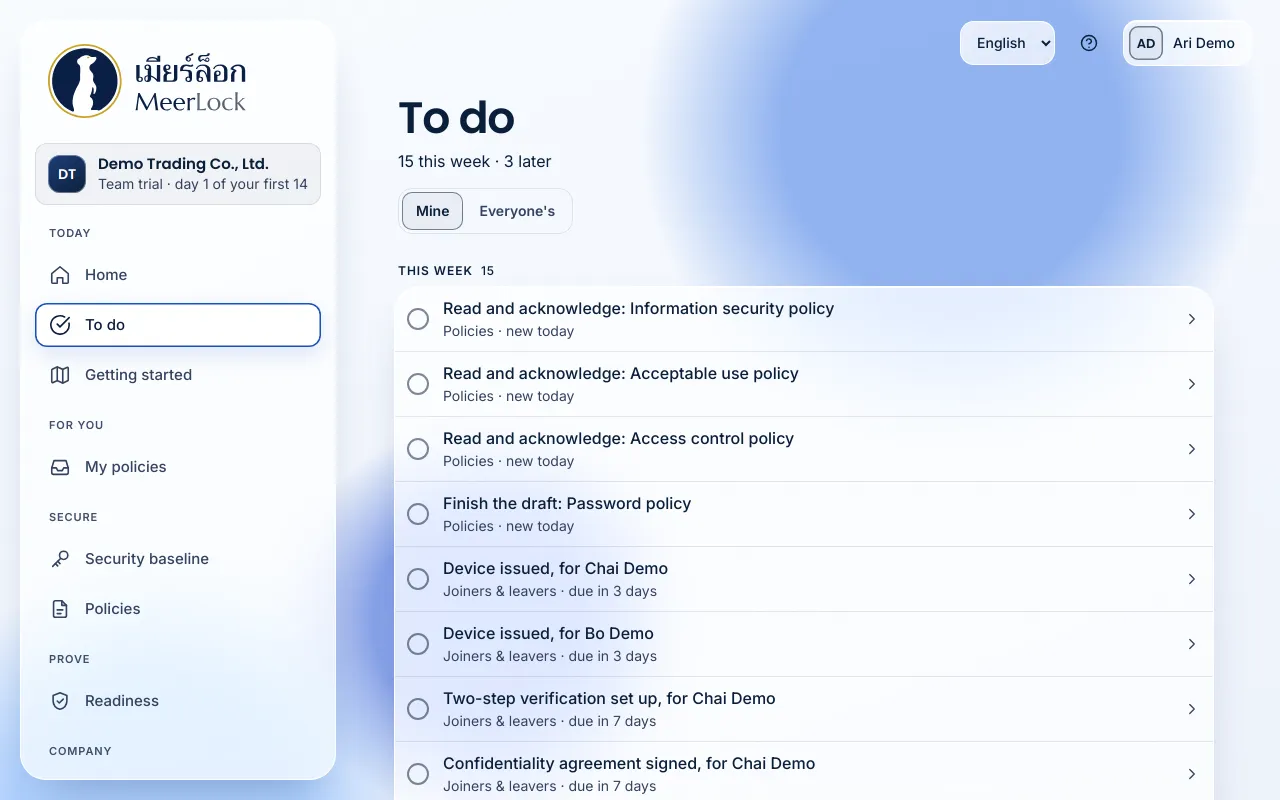
To do is one list of what each person should do next: policies to read, approvals to give, reviews that are due, access to decide on and more. Each row opens the thing itself, so you do not have to remember where it lives.
How to use it
- Open To do from the menu, or from the line on Home such as "3 things in To do".
- Rows are grouped as Late, This week and Later. The line at the top counts each group. Done recently shows what you finished. The chips above the list show one section at a time, such as Policies or Access.
- Each row says what to do and when: "due today", "due in 3 days", "waiting 5 days", or "2 hours late" for a deadline counted in hours.
- Press a row to open the policy, record or request it is about. When you do the work, the row leaves the list by itself.
- Admins and people who manage an area can switch Whose tasks from Mine to Everyone's, at the right end of the row under the title, to see who has what. Rows nobody holds show as Unassigned.
- A line such as "4 more not shown" means the list is trimmed. Open the area itself for the rest.
What lands here
- Policies to read and acknowledge, and policies waiting for you to approve.
- Policy reviews, drafts to finish and changes asked of you.
- Risks, suppliers, privacy requests and privacy reviews that are due.
- Incident follow-ups, reports to finish, duties to tell and planned exercises.
- Joining, leaving and role change steps for a person, and access to decide on, create, change or remove.
- Recurring actions, protections that need an owner or a date, and a trial about to end.
- Translations that are paused or ready to read.
Good to know
- To do shows only what your role lets you act on. An employee mostly sees policies to read.
- Late rows also appear on Home.
- A section that could not be read right now says so at the top: "Some sections could not be read just now." Refresh in a minute.
- "You're up to date." means you have handled everything on your list.